DRIVING
Driving proceduresPower (ignition) switch
Performing the following operations when carrying the electronic key on your person starts the hybrid system or changes power switch modes.
Starting the hybrid system
- Pull the parking brake switch to
check that the parking brake is
set.(Click Here)
The parking brake indicator will come on. - Check that the shift lever is in P.
- Firmly depress the brake pedal.
 and a message will be displayed
on the multi-information display.
If it is not displayed, the hybrid system
cannot be started.
and a message will be displayed
on the multi-information display.
If it is not displayed, the hybrid system
cannot be started. - Press the power switch shortly
and firmly.
When operating the power switch, one short, firm press is enough. It is not necessary to press and hold the switch.
If the “READY” indicator turns on, the hybrid system will operate normally.
Continue depressing the brake pedal until the “READY” indicator is illuminated.
The hybrid system can be started from any power switch mode. - Check that the “READY” indicator is illuminated.
The vehicle will not move when the “READY” indicator is off.
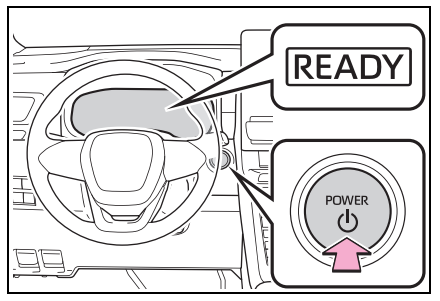
∎ If the hybrid system does not start
- The immobilizer system may not have been deactivated. (Click Here) Contact your Toyota dealer.
- If a message related to start-up is shown on the multi-information display, read the message and follow the instructions.
- If the door is unlocked with the mechanical key, the hybrid system cannot be started using the smart entry & start system. Refer to (Click Here) to start the hybrid system. However, if the electronic key is carried inside the vehicle and the doors are locked (Click Here), the hybrid system can be started.
∎ When the ambient temperature is low, such as during winter driving conditions
When starting the hybrid system, the flashing time of the “READY” indicator may be long. Leave the vehicle as it is until the “READY” indicator is steady on, as steady means the vehicle is able to move.
∎ Sounds and vibrations specific to a Hybrid Electric Vehicle
(Click Here)∎ If the 12-volt battery is discharged
The hybrid system cannot be started using the smart entry & start system. Refer to (Click Here) to restart the hybrid system.∎ Electronic key battery depletion
(Click Here)∎ Conditions affecting operation
(Click Here)∎ Note for the entry function
(Click Here)∎ If there is a malfunction in the smart entry & start system
If “Smart Entry & Start System Malfunction See Owner’s Manual” is displayed on the multi-information display, the system may be malfunctioning. Have the vehicle inspected by your Toyota dealer immediately.∎ If the “READY” indicator does not come on
In the event that the “READY” indicator does not come on even after performing the proper procedures for starting the vehicle, contact your Toyota dealer immediately.∎ If the hybrid system is malfunctioning
(Click Here)∎ Electronic key battery
(Click Here)∎ Operation of the power switch
- If the switch is not pressed shortly and firmly, the power switch mode may not change or the hybrid system may not start.
- If attempting to restart the hybrid system immediately after turning the power switch to OFF, the hybrid system may not start in some cases. After turning the power switch to OFF, please wait a few seconds before restarting the hybrid system.
∎ Customization
If the smart entry & start system has been deactivated in a customized setting, refer to (Click Here)WARNING
Doing so may cause an accident resulting in death or serious injury.
NOTICE
Stopping the hybrid system
- Stop the vehicle completely.
- If the parking brake is in manual
mode, set the parking brake.(Click Here)
Check the parking brake indicator is illuminated. - Shift the shift lever to P.(Click Here)
Do not press the shift release button after shifting the shift lever to P.
*Applicable from March 2025 onwards. - Press the power switch.
The hybrid system will stop, and the meter display will be extinguished.
Release the shift lever when pressing the power switch. - Release the brake pedal and check that “ACCESSORY” or “IGNITION ON” is not shown on the multi-information display.
WARNING
- f you want to stop the hybrid system in an emergency while driving the vehicle, press and hold the power switch for more than 2 seconds, or press it briefly 3 times or more in succession. (Click Here) However, do not touch the power switch while driving except in an emergency. Turning the hybrid system off while driving will not cause loss of steering or braking control. However, power assist for the steering wheel may be lost making it difficult to steer smoothly before stopping the vehicle depending on the remaining charge in the 12-volt battery or usage conditions. In this situation, you should pull over and stop the vehicle as soon as it is safe to do so.
- If the power switch is operated while the vehicle is running, a warning message will be shown on the multi-information display and a buzzer sounds.
- When restarting the hybrid system after an emergency shutdown, shift the shift lever to N and press the power switch shortly and firmly.
Changing power switch modes
Modes can be changed by pressing the power switch with the brake pedal released. (The mode changes each time the switch is pressed.)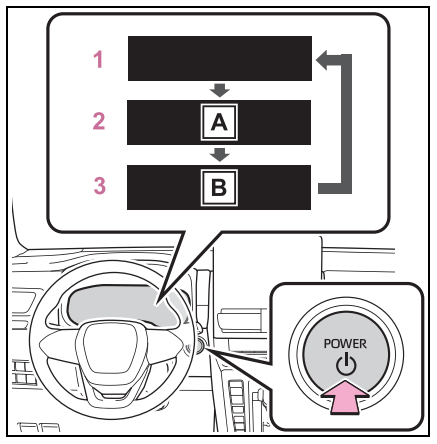
A “ACCESSORY”
B “IGNITION ON”
- OFF*
The emergency flashers can be used. - ACC
Some electrical components such as the audio system can be used.
“ACCESSORY” will be displayed on the multi-information display. - ON
All electrical components can be used.
“IGNITION ON” will be displayed on the multi-information display.
* : If the shift lever is in a position other than P or the shift release button is pressed when turning off the hybrid system, the power switch will remain ON, will not turn to OFF.
*Applicable from March 2025 onwards.
∎ Auto power off function
- If the vehicle is left in ACC or ON (the hybrid system is not operating) for more than 20 minutes with the shift lever is in P or the shift release button is not pressed, the power switch will automatically turn to OFF.
- If the 12-volt battery is low with the
shift lever is in P or the shift release
button is not pressed, and the power
switch is in ACC or ON (the hybrid
system is not operating), a buzzer
sounds and a message will be displayed
on the multi-information display.
If this continues, the power
switch is automatically turn to OFF.
*Applicable from March 2025 onwards.
However, this function cannot entirely prevent the 12-volt battery discharge. Do not leave the vehicle with the power switch in ACC or ON for long periods of time when the hybrid system is not operating.
NOTICE
- Do not leave the power switch in ACC or ON for long periods of time without the hybrid system on.
- If “ACCESSORY” or “IGNITION ON” is displayed on the multi-information display, the power switch is not in OFF. Exit the vehicle after turning the power switch to OFF.
When stopping the hybrid system with the shift lever in a position other than P
If the hybrid system is stopped when the shift lever is in a position other than P or the shift release button is pressed, the power switch will not be turned to OFF. Perform the following procedure to turn the switch to OFF:- Check that the parking brake is set.
- Shift the shift lever to P.
Do not press the shift release button after shifting the shift lever to P.
*Applicable from March 2025 onwards. - Check that “IGNITION ON” is displayed on the multi-information display and press the power switch shortly and firmly.
- Check that “ACCESSORY” or “IGNITION ON” on the multi-information display is off.
NOTICE
*Applicable from March 2025 onwards.